
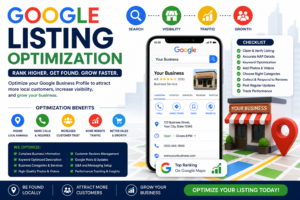
Boost Your Local Visibility & Customers
Introductions
In todays world local search plays a big role in business success. When people search for services near them businesses with optimized listings appear at the top. This is where **Google listing optimization** becomes essential.
By optimizing your business listing you can attract local customers increase visibility and grow your brand online.
## 💡 What is Google Listing Optimization?
**Google listing optimization** is about improving your business profile on Google Business Profile to rank in local search results and Google Maps. It includes:
* Updating business information
* Adding images and posts
* Managing customer reviews
## 🔥 Why Google Listing Optimization is Important
### ✔ Appear in Local Searches
Rank higher when users search on Google for services near them.
### ✔ Increase Customer Trust
A complete profile builds credibility with customers.
### ✔ Drive More Traffic
Get website visits and calls from people interested in your business.
### ✔ Boost Sales
Local searches often lead to conversions and more sales.
## 📊 Key Elements of an Optimized Google Listing
### 📌 Accurate Business Information
Your business name, address and phone number (NAP) must be correct.
### 🖼 High-Quality Images
Add professional photos of your business to showcase what you offer.
### ⭐ Customer Reviews
Encourage customers to leave reviews on your Google listing.
### 📝 Business Description
Write an keyword-optimized description of your business.
### 📍 Categories & Services
Select relevant business categories to help customers find you.
## 🚀 How to Optimize Your Google Listing
### Step 1:. Verify Your Listing
Make sure your business is verified on Google.
### Step 2: Add Complete Information
Fill out all sections of your Google Business Profile
### Step 3: Use Target Keywords
Include keywords naturally in your business description.
### Step 4: Upload Images
Keep your listing fresh and engaging with new images.
### Step 5: Respond to Reviews
Engage with customers by responding to their reviews.
## 🌟 Advanced Google Listing Optimization Tips
### 📍 Use Location-Based Keywords
Target searches like “near me” or city-based queries to attract customers.
### 📊 Post Updates Regularly
Share offers, news and updates to keep customers informed.
### 🔍 Add FAQs
Answer common customer questions to provide information.
### 📈 Track Insights
Analyze. Improve your strategy to get better results.
## ⚠️ Common Mistakes to Avoid
* Incomplete business information
* Ignoring customer reviews
* Using categories
* Not updating listing regularly
* Keyword stuffing
- Google Business Profile: https://www.google.com/business/
- Google Business Profile Help: https://support.google.com/business/
- Google Search Central: https://developers.google.com/search
- Google Maps: https://maps.google.com/
## 💼 Benefits of Google Listing Optimization
* Higher local rankings on Google
* customer inquiries and interest
* Increased website. Visits
https://theseocraft.com/wp-admin/post.php?post=992&action=edit
* Strong brand visibility online
* Better conversion rates and sales
## 🏁
**Google listing optimization** is a strategy, for local business growth. By optimizing your listing you can attract more customers improve your visibility and stay ahead of competitors.
👉 Keep your profile updated engage with customers and focus on quality to achieve long-term success.
## 🔑 SEO Extras ( to Use)
**Meta **
Google Listing Optimization | Improve Local Rankings
**Meta Description:**
Learn Google listing optimization techniques to rank higher in local searches and attract more customers.
**Focus Keywords:**
* google listing optimization
* google business profile optimization
* seo listing
* google maps ranking